
Flex Vouchers
What benefits do I get as a Flex Package Member?
- Discounted ticket voucher package (minimum 16 tickets)
- Use tickets for any match and redeem online up to the day before the match
- The ability to flex seat location within your neighborhood for any of our regular season games
- Priority access for US Open Cup, Friendlies and Playoff matches
Can I sit next to my friend if we have Flex Vouchers in the same section?
Your account representative will do their best to accommodate you and your friend(s) to arrange seating locations next to one another. Flex tickets are redeemed online so coordinate with your friends before reserving seats.
How do I redeem my Flex Vouchers?
Flex Package Members will log into their Switchbacks-SeatGeek ticket account and go to the “Flex Redemption” offer upon the offers tab of their account manager to redeem as many of their tickets to any match of their choice up to kickoff of the chosen match. Once you have selected seats you will be taken to the checkout screen. If you have selected better seat(s) than the package you originally purchased, you will need to pay the difference at checkout. If you have selected the same seat as your package type everything should $0.00 out and there should be no payment required. Flex tickets are unreserved seats, meaning the best seats in each section are first come first serve. The earlier flex tickets are reserved the more seats are available to choose from. To redeem flex tickets, click on this link (https://seatgeek.com/switchbacksfc/offers) to choose your seats.
What does it mean to be opted-in to playoff tickets and auto-renewal flex vouchers?
Purchasing Flex Tickets opts-in your account to auto-purchase two(2) Playoff Tickets for all home playoff matches at Weidner Field for current and future seasons and auto renewal of your Flex Tickets for the same quantity and location of flex tickets purchased for all future seasons. Switchbacks FC provides this service to preserve Flex Tickets and Locations at the best pricing available. Switchbacks FC will provide and communicate an opt-out period prior to any charges being made for any home playoff matches or future seasons.
Step-by-step video tutorial on how to redeem Flex tickets
SeatGeek
How do I create/register a SeatGeek account?
To create/register a SeatGeek account, please visit https://seatgeek.com/#register and you will be prompted to create an account. If you already have a SeatGeek account you can link that with your Switchbacks account to not create multiple accounts. If you have any issues accessing your tickets, please take a look at the “Ticket Access” portion of the STM Information tab on Switchbacksfc.com or give the front office a call at 719-368-8480.
How do I link my email to my SeatGeek account?
To link your SeatGeek account to your email address, please visit https://seatgeek.com/switchbacksfc/verify and follow the directions to get your tickets to appear in the app. If you have any issues accessing your tickets, please take a look at the “Ticket Access” portion of the STM Information tab on Switchbacksfc.com or give the front office a call at 719-368-8480.
What if I forgot my SeatGeek password?
To link your SeatGeek account to your email address, please visit https://seatgeek.com/switchbacksfc/verify and follow the directions to get your tickets to appear in the app. If you have any issues accessing your tickets, please take a look at the “Ticket Access” portion of the STM Information tab on Switchbacksfc.com or give the front office a call at 719-368-8480.
Ticket Access Troubleshooting
Have you downloaded the Switchbacks FC app to your mobile device?
All Switchbacks FC tickets will be distributed via the Switchbacks App available on the App Store and Google Play.
Have you created a SeatGeek ticketing account?
To create/register a SeatGeek ticketing account, please visit https://seatgeek.com/#register and you will be prompted to create an account. If you already have a SeatGeek ticketing account you can link that with your Switchbacks account to not create multiple accounts.
Have you linked your Switchbacks FC tickets to your SeatGeek account?
To link your SeatGeek ticketing account to your email address and your Switchbacks FC tickets, please visit https://seatgeek.com/switchbacksfc/verify and follow the directions to get your tickets to appear in the app.
Can you log into your SeatGeek account on the app?
To access your tickets on the app, you will need to log into your SeatGeek Ticketing account on the Switchbacks FC App. If you have forgotten your SeatGeek login password, please visit https://seatgeek.com/forgot_password to get instructions on how to reset your password. *TROUBLE-SHOOTING TIP* – If you are receiving a looping error and are unable to get a password reset, this means you likely do not have a SeatGeek ticketing account created and will need to register a SeatGeek ticketing account using Step 2. *TROUBLE-SHOOTING TIP* – If you do not receive the password reset email from SeatGeek within 10 minutes of submitting a request, please email tickets@switchbacksfc.com or call the Switchbacks FC front office at 719-368-8480 to receive help getting your password reset escalated with SeatGeek.
Can you view the QR ticket barcode within the tickets tab of the app?
Once you have opened the app, you will need to click over to the tickets tab located at the bottom center of the app.

Next you must click “MY TICKETS” to bring up all matches you have active tickets you have bought or flexed.
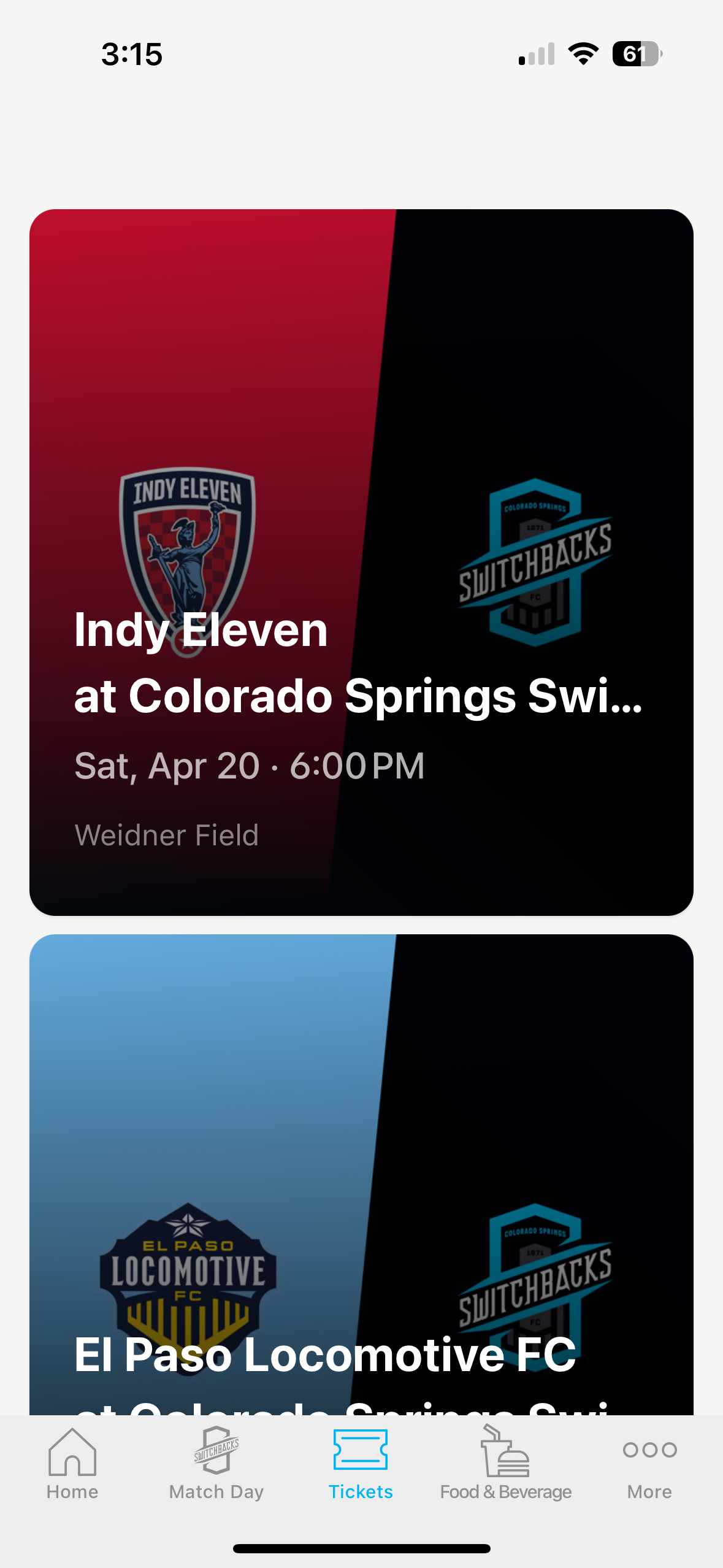
After this, you will need to click into the specific match you are trying to access tickets for. From here you will click on the tickets you would like to get scanned, send, or sell and the barcode and prompts will appear on the screen.
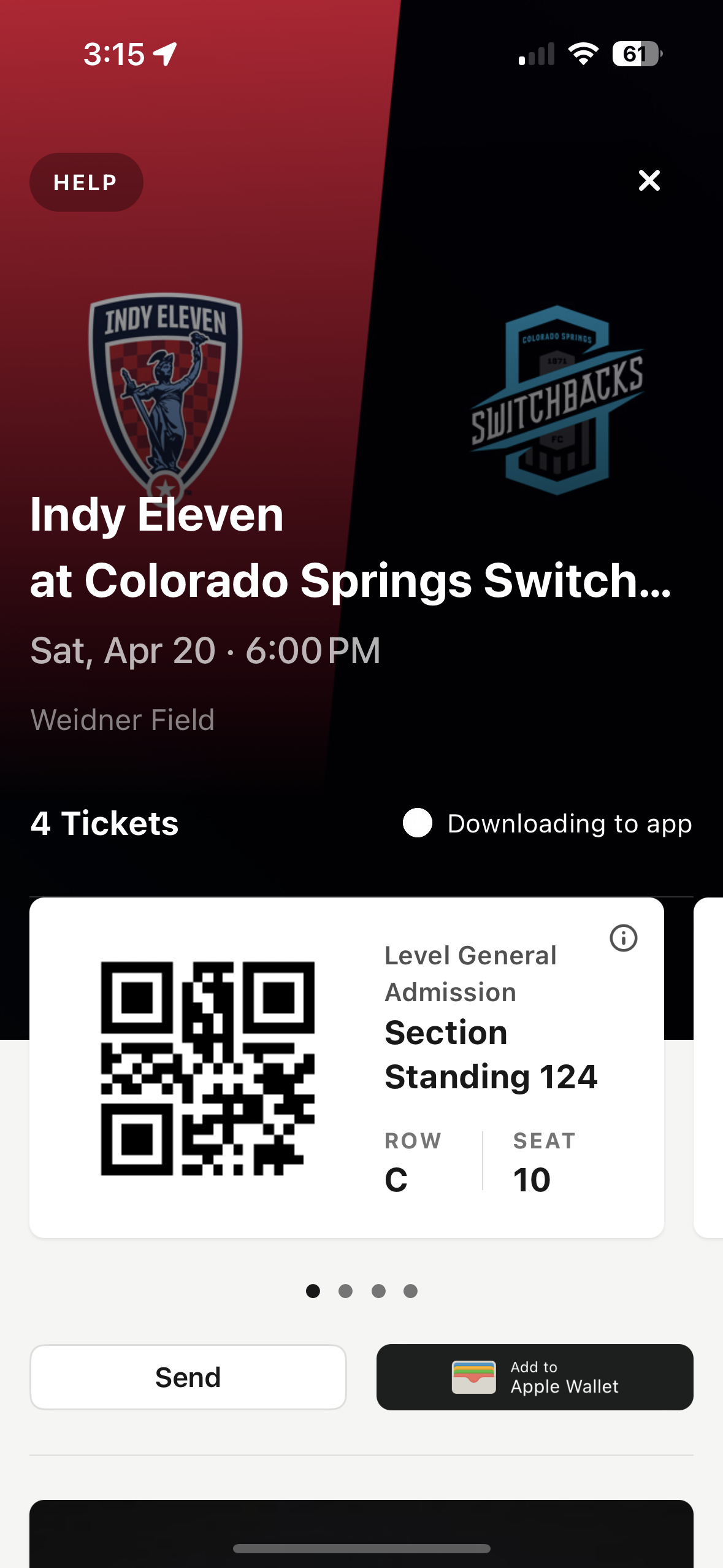
*TROUBLE-SHOOTING TIP* – If you have completed all the steps above but upon the last step you receive a page that says “ticket barcodes will be available in time for the match”, please email tickets@switchbacksfc.com or call the front office at 719-368-8480 to have a ticket operator help assist getting those barcode to you.
Have you followed all the instructions above and still can not access your tickets?
If you have followed all the instructions above and are still having issues accessing your tickets, please email tickets@switchbacksfc.com or call the front office at 719-368-8480 to have a ticket operator help assist with these issues. You can also stop by the box office located on the West side of Weidner Field located at 111 W Cimarron St., Colorado Springs, CO, 80903 to get help in person.